
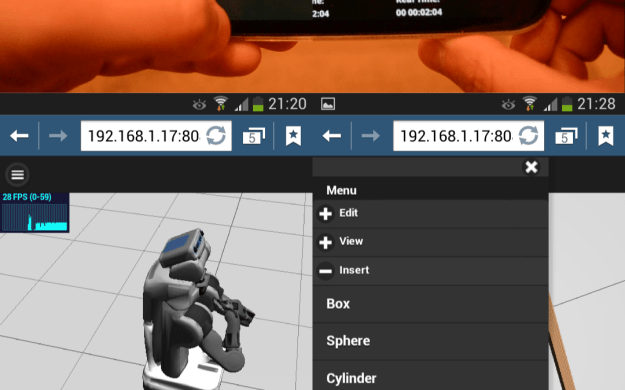
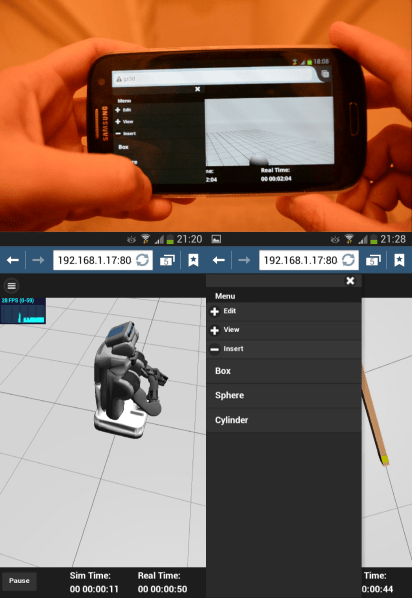
The past 3 days I’ve been working on an initial version of the mobile interface for Gzweb. Before anything, some introductions. Gzweb‘s is based on jQuery and jQuery UI:

jQuery is a JavaScript library that helps with a lot of different things on a website. Within Gzweb it’s used mostly to handle events related to the GUI (things being clicked, basically).

jQuery UI is a library built on top of jQuery which facilitates styling the GUI, adding animations, interactions and so on. On Gzweb, it’s responsible for the color theme, buttons, menus and whatnot. It’s not very suitable for mobile interfaces though… For that, the jQuery team came up with:

Instead of adding mobile-appropriate functionality to jQuery UI, they came up with a completely new library: jQuery Mobile. Like jQuery UI, it adds functionality to jQuery, so you always wanna include both jQuery and one of the interface libraries (jQuery + jQuery UI or jQuery + jQuery Mobile). The catch is that jQuery UI and jQuery Mobile are not compatible! :O They have overlapping functions, so you can’t really use both at the same time… Not without a lot of tweaking at least. This makes it difficult to use this framework for a single website that doubles as desktop and mobile.
Options…
There are many important decisions to be made here. If we use jQuery Mobile, we can either:
- Make two separate websites (desktop/mobile)
- Make one website that has a lot of media queries to change styles according to the device
- Make one website that uses jQuery Mobile for both mobile and desktop versions
If the goal is to have two websites, I could also try using other libraries which don’t overlap with jQuery UI, or even going low level and writing the GUI from scratch.
jQuery Mobile‘s API seemed so simple that I figured I could dedicate a couple of days to implement a rough version of Gzweb with it and see what it is capable of.
Features
Before starting, I must decide what features I’m going to implement. Here is a non-exhaustive list of features I found on Gazebo and Gzweb. When I say Gazebo, I mean gzclient 1.9.1, Gazebo‘s main graphical interface. By Gzweb I mean the development version, not the 1.0. Gazebo Mobile refers to the simple interface I’ve built so far with jQuery Mobile. I’ve arranged features in a way that made sense to me, not necessarily by where they can be found.
| Gazebo |
Gzweb | Gzweb Mobile | ||
| Clock | ||||
| Play/Pause | ✔ | ✔ | ✔ | |
| Buttons | Button | Button | ||
| Time step | ✔ | ✘ | ✘ | |
| Button | ||||
| Reset world | ✔ | ✔ | ✔ | |
| Button | Button | Button | ||
| Sim/Real time | ✔ | ✔ | ✔ | |
| Display | Display | Display | ||
| Real time factor | ✔ | ✘ | ✘ | |
| Display | ||||
| Real time update rate | ✔ | ✘ | ✘ | |
| Input value | ||||
| Maximum step size | ✔ | ✘ | ✘ | |
| Input value | ||||
| Build world | ||||
| Insert | ||||
| Models | ||||
| Unit cube | ✔ | ✔ | ✔ | |
| Button, move, click | Button, move, click | Button, drag touch | ||
| Unit sphere | ✔ | ✔ | ✔ | |
| Button, move, click | Button, move, click | Button, drag touch | ||
| Unit cylinder | ✔ | ✔ | ✔ | |
| Button, move, click | Button, move, click | Button, drag touch | ||
| Others | ✔ | ✘ | ✘ | |
| Button, move, click | ||||
| Lights | ||||
| Point light | ✔ | ✘ | ✘ | |
| Button, move, click | ||||
| Spot light | ✔ | ✘ | ✘ | |
| Button, move, click | ||||
| Directional light | ✔ | ✘ | ✘ | |
| Button, move, click | ||||
| Edit | ||||
| Models | ||||
| Translate (translate mode) | ||||
| Free | ✘ | ✔ | ✘ | |
| Left-press + drag handle | ||||
| each axis | ✔ | ✔ | ✘ | |
| Left-press + (X/Y/Z) + drag / input values | Left-press + drag handle | |||
| within a plane | ✘ | ✔ | ✘ | |
| Left-press + drag (ground plane) | Left-press + drag handle | |||
| Rotate (rotate mode) | ||||
| About vertical | ✔ | ✘ | ✘ | |
| Left-press + drag | ||||
| each axis | ✔ | ✔ | ✘ | |
| Left-press + (X/Y/Z) + drag / input values | Left-press + drag handle | |||
| Scale | ||||
| Keeping aspect ratio | ✘ | ✘ | ✘ | |
| each axis | ✘ | ✘ | ✘ | |
| Others | ||||
| Static | ✔ | ✘ | ✘ | |
| Button | ||||
| Link | ✔ | ✘ | ✘ | |
| Several options | ||||
| Scene | ||||
| Ambient | ✔ | ✘ | ✘ | |
| Input RGB values | ||||
| Background | ✔ | ✘ | ✘ | |
| Input RGB values | ||||
| Physics | ||||
| Gravity | ✔ | ✘ | ✘ | |
| Input X/Y/Z values | ||||
| Solver iterations | ✔ | ✘ | ✘ | |
| Input value | ||||
| Solver SOR | ✔ | ✘ | ✘ | |
| Input value | ||||
| Constraint Force Mixing | ✔ | ✘ | ✘ | |
| Input value | ||||
| Error Reduction Parameter | ✔ | ✘ | ✘ | |
| Input value | ||||
| Maximum velocity | ✔ | ✘ | ✘ | |
| Input value | ||||
| Surface layer | ✔ | ✘ | ✘ | |
| Input value | ||||
| Others | ||||
| Save world | ✔ | ✘ | ✘ | |
| Button | ||||
| Reset model poses | ✔ | ✔ | ✔ | |
| Button | Button | Button | ||
| Building editor | ✔ | ✘ | ✘ | |
| Button opens editor | ||||
| View | ||||
| Move camera | ||||
| Translate | ||||
| Free | ✔ | ✔ | ✔ | |
| Left-press + drag | Left-press + drag | 3-finger drag | ||
| each axis | ✔ | ✘ | ✘ | |
| Left-press + (X/Y/Z) + drag | ||||
| Orbit | ||||
| Free | ✔ | ✔ | ✔ | |
| Middle-press + drag | Middle-press + drag | 1-finger drag | ||
| each axis | ✔ | ✘ | ✘ | |
| Middle-press + (X/Y/Z) + drag | ||||
| Zoom | ||||
| Free | ✔ | ✔ | ✔ | |
| Scroll wheel | Scroll wheel / Right-press + drag | Pinch | ||
| each axis | ✔ | ✘ | ✘ | |
| Scroll wheel + (X/Y/Z) | ||||
| Accelerated zoom | ✔ | ✘ | ✘ | |
| Alt + scroll wheel | ||||
| Others | ||||
| Jump to object | ✔ | ✘ | ✘ | |
| Double click | ||||
| Show | ||||
| Visual | ||||
| Show grid | ✔ | ✘ | ✘ | |
| Button | ||||
| Transparent | ✔ | ✘ | ✘ | |
| Button | ||||
| Wire frame | ✔ | ✘ | ✘ | |
| Button | ||||
| SSAO effect | ✘ | ✔ | ✔ | |
| F2 | Button | |||
| Shadows | ✔ | ✘ | ✘ | |
| Toggle | ||||
| Physics | ||||
| Enable | ✔ | ✘ | ✘ | |
| Toggle | ||||
| Collisions | ✔ | ✔ | ✔ | |
| Button | Button | Button | ||
| Joints | ✔ | ✘ | ✘ | |
| Button | ||||
| Center of mass | ✔ | ✘ | ✘ | |
| Button | ||||
| Contacts | ✔ | ✘ | ✘ | |
| Button | ||||
| Others | ||||
| Reset view/camera | ✔ | ✘ | ✘ | |
| Button | ||||
| Select object | ✔ | ✔ | ✘ | |
| Click (object menu) | Click | |||
| Full screen | ✔ | ✔ | ✔ | |
| Button | F11 | F11 | ||
| Topic visualization | ✔ | ✘ | ✘ | |
| Button | ||||
| Log data | ✔ | ✘ | ✘ | |
| Button |
The 1st prototype
On the screenshots and video, you can see some of the styling and functionality of the interface I’ve implemented so far. The design was highly based on the discussions I had with Steffi and Ian, but of course it is far from a satisfactory version. Here‘s the repository I’m working at. I won’t describe the whole process, but I’ll make some comments:
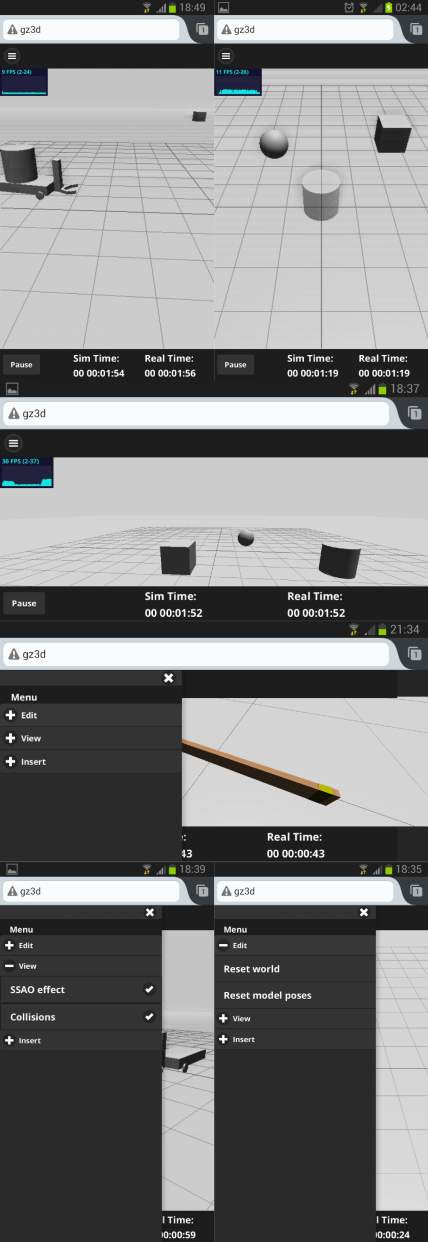
- The page is divided into 4 parts: header, footer, canvas and left panel.
- The header only contains the button to open the container and the footer contains the clock. They are always visible for now.
- The panel contains the menu styled like an accordion (or container set). Originally I was making the panel push the canvas to the side as it opens, but when inserting models it feels like overlaying the canvas makes more sense since things just stay in place, so that’s how it is right now.
- The menu options include those on Gzweb‘s menu (reset world/models, view collisions), plus an SSAO effect which is accessible by F2 on Gzweb. I also moved the insertion of basic shapes (box/cylinder/sphere) from a toolbar to the menu. For the toggle-type options, there’s a checkbox.
- The canvas fits between header and footer and is resized with the window (that was one of the most difficult things to do). It’s still not perfect though, going from portrait to landscape on a mobile works well, but coming back not so much.
- Camera movement is controlled by touch as: one-finger = orbit, two-finger pinch = zoom, three-finger = translation.
- Currently, the canvas responds to touch even on top of the panel, which is a problem when scrolling the panel.
- Shapes are inserted as follows: click on its name on the panel -> close the panel (either with the close button or by tapping the canvas) -> drag the model to the desired position by touch -> un-touch. The model is transparent while until it is fixed.
- There’s no way to edit the models once they’ve been placed (translate and rotate modes). This is the main difference from Gzweb right now as you can see on the table above. I haven’t worked on it since we’re still deciding on what kinds of interactions would be interesting.
- Getting custom buttons for play/pause was getting harder than I expected, so I’ll do it later.
- So far I’ve kept all features mouse-compatible, so the site can be used with non-touch devices. (In case we decide on a single website).
“Wait, weren’t you supposed to be optimizing the graphics first?”
Yes, my original plan was to first optimize the graphics performance for mobile devices, and then think about the interface. There’s a reason for that. While I was applying for OPW, I had quickly tested the original Gzweb on a Galaxy S3’s Android browser and as I showed on a video, it just doesn’t render. Back then, I thought this was because the models were too large to be rendered, considering that my previous Three.js project had rendered well on the same browser. So I thought “Well, unless something renders I cannot even start thinking of an interface”. After I started checking different browsers and devices however, I realized that on some browsers/devices, although with a low fps, things were rendering. For the interface, that’s all I need to begin with.
Another reason for my detour is that I wanted to feel like I had made some progress. Although I’ve been slowly contributing to Gzweb, I have made almost no progress towards optimizing the graphics. I’ve been reading blogs, academic papers, watching videos, looking for code examples, getting familiar with different 3D file formats… I’m all over the place. Ian is helping me focus and narrow down alternatives. On the other hand, the discussions about the interface seemed to be progressing. All this led me to make a little new goal:
Have a somewhat functional mobile interface before 2014
And here we are 🙂 Happy New Year 😉

